This guide covers how administrators can remove members from a DroneDeploy organization. Removing a member is necessary when an employee leaves the company or no longer requires access to organization's data.
Availability
Available to Organization Administrators.
Applies to members on Teams and Enterprise accounts.
What happens when a member is removed?
Before removing a member, it is important to understand the impact on their account and data:
Account Downgrade: The user's account is downgraded to the free "Explorer" plan. They will lose access to advanced annotation, analysis, and processing features.
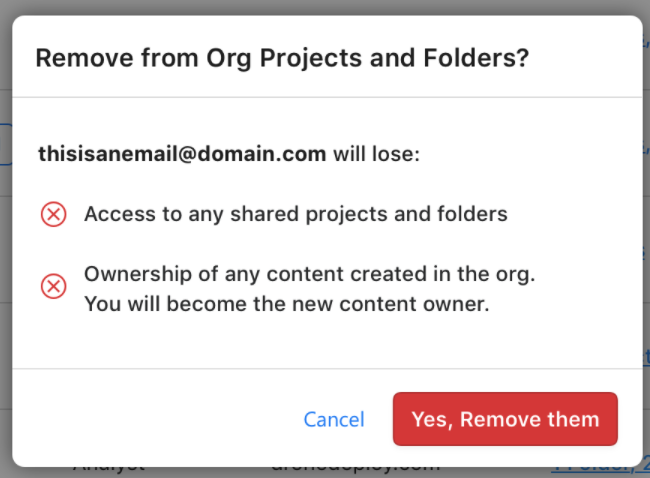
Data Transfer: Any maps created by the user while they were a member of the organization are automatically transferred to the Organization Owner.
Access Loss: The user will immediately lose access to all maps, projects, and folders owned by or shared within the organization.
Subscription Options: The removed member retains their account and can purchase their own individual DroneDeploy subscription if desired.
How to remove a member
Follow these steps to remove a user from your organization.
Login to DroneDeploy and navigate to Settings.
Locate your organization and click Manage.
Select the Users tab to view a list of current members.
Locate the member you wish to remove.
Click the Trash Can icon next to their name. 6. A confirmation prompt will appear. Confirm the action to remove the user.
Removing external users
You can use the same method to remove users who are not part of your organization but have been invited to specific projects or folders.
Navigate to the Users section as described above.
Locate the external user and click the Trash Can icon.
Result: The user will lose access to any shared projects or folders from your organization. Any data they uploaded to your organization's projects remains with your organization.
FAQs
Q: Can a removed member still access their old maps?
A: No. They will no longer see any maps owned by your organization. However, maps they created are transferred to the Organization Owner so the data is not lost.
Q: Does deleting a user delete their data?
A: No. The data they created while in the organization is transferred to the Organization Owner.
Q: What plan will the user be on after I remove them?
A: They will be placed on the free "Explorer" plan.